English
 한국어
한국어 Tiếng Việt

USER GUIDE ACCORDING TO CIRCULAR 99
Instructions for converting the chart of accounts and reports according to Circular 99 on AMnote accounting software. To do this, businesses need to follow these steps:
1. Establish an accounting system in accordance with Circular 99
1.1. Instruction
– The software has already set up a level 1 account system in accordance with the regulations in Circular 99.
– For level 2 and level 3 accounts: In addition to the accounts specified in Circular 99, the software also creates a number of detailed sub-accounts to serve the internal monitoring and management needs of the enterprise.
+ Businesses can delete detailed sub-accounts if they no longer need them and these accounts are not part of the accounting system outlined in Circular 99.
+ Businesses are allowed to add new detailed sub-accounts to serve their specific management requirements.
Important note:
+ As of January 1, 2026, for companies that already have data from 2025 or earlier, the software will create an accounting system based on Circular 99 according to the following principles.
- Retain the customer’s original Circular 200 Accounts.
- Add new accounts.
| 1383 | Special consumption tax on imported goods |
| 215 | Biological assets |
| 2151 | Livestock for periodic production |
| 21511 | Livestock for periodic production that have not yet reached maturity |
| 21512 | Livestock for production periodically reach maturity |
| 215121 | Original price |
| 215122 | Accumulated depreciation value |
| 2152 | Livestock that takes products once |
| 2153 | Seasonal or one-time crop |
| 2295 | Provision for loss of biological assets |
| 2414 | Upgrade and renovate fixed assets |
| 332 | Must pay dividends, profits |
| 6275 | Taxes, fees, charges |
| 82111 | Current corporate income tax expenses according to the provisions of the Law on Corporate Income Tax |
| 82112 | Additional corporate income tax expense under the global minimum tax rules |
Delete outdated accounts that are no longer relevant (This does not include deleting detailed account information)
| 1385 | Receivables from privatization |
| 161 | Career expenses |
| 1611 | Expenses incurred last year |
| 1612 | This year’s career expenses |
| 3385 | It must be returned to the privatization process |
| 417 | Business Restructuring Support Fund |
| 441 | Capital investment for basic construction |
| 461 | Funding for operational activities |
| 4611 | Previous year’s operational budget |
| 4612 | Funding for this year’s activities |
| 466 | Funding source used to acquire fixed assets. |
| 611 | Purchase |
| 6111 | Purchase raw materials and supplies |
| 6112 | Purchase goods |
| 631 | Production cost |
- Rename accounts
| 112 | Non-term deposit |
| 155 | Product |
| 158 | Raw materials and supplies at bonded warehouses |
| 171 | Government bond repurchase and resale transactions |
| 2413 | Repair and periodic maintenance of fixed assets |
| 242 | Costs pending allocation |
| 244 | Deposit, collateral |
| 337 | Payment according to construction contract progress |
| 3387 | Revenue pending allocation |
| 3521 | Product and goods warranty reserve |
| 3525 | Other provisions |
| 3562 | The Science and Technology Development Fund has formed assets |
| 4112 | Capital surplus |
| 419 | Buyback of own shares |
| 4211 | Accumulated undistributed profit after tax up to the end of the previous year |
| 6412 | Cost of materials and packaging |
| 6415 | Taxes, fees, charges |
- Change the account number “3524 – Other provisions for liabilities” to “3525 – Other provisions for liabilities”
+ Some level 2 and level 3 sub-accounts created by the software are not only used for internal monitoring but also for classifying and displaying the correct indicators on reports, especially the Financial Statements (D-A menu), for example, short-term/long-term classification. Therefore, these sub-accounts should only be deleted when it is certain they will not be used, to avoid affecting the aggregation and display of data in related report menus.
1.2. How to do it
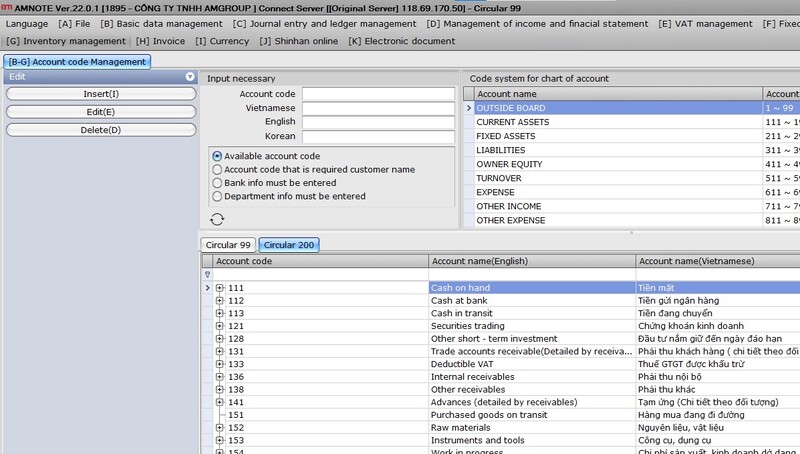
Access the menu [B-G] – Account Management
Select mode: Circular 99
Perform the operations:
Add/Edit/Delete accounts. The process is similar to previous versions of the software.
2. Set the opening balance for 2026
2.1 Instruction
2.1.1 For businesses that already have outdated accounting data
Instructions: The opening balance for 2026 is carried forward from the closing balance for 2025.
Before making the balance transfer, the accountant needs to prepare and review the following:
– Clearly define: to which account, according to Circular 99, will the balance of each account under Circular 200 be transferred.
– List of remaining inventory at the end of the period as of December 31, 2025.
– List of fixed assets and prepaid expenses with remaining depreciation/amortization value as of the end of December 2025.
Software support for balance transfers:
– The software has pre-set mechanisms to support account balance transfers, specifically:
+ Transfer the balance according to the principle of 1 account → 1 account when the old account and the new account correspond.
+ Automatically detect and pre-configure settings for cases of duplicate accounts between Circular 200 and Circular 99.
+ Allows users to proactively choose the account to receive the balance in the following cases: No duplicate accounts exist, or only accounts at a more detailed level as specified in Circular 99 exist.
👉 These cases will be displayed in yellow for easy identification and processing by accountants.
Special case:
If an account under Circular 200 needs its balance allocated to multiple different accounts under Circular 99, the enterprise must first create the corresponding sub-accounts within the Circular 200 accounting system. Detailed accounting should be performed in 2025 to ensure that the ending balances of each sub-account are accurate before transferring them to 2026.
Alternatively, transfer the funds to a sub-account first, then edit the balance directly.
Support for transferring fixed assets/prepaid expenses with the following principles:
+ Suspension of existing assets on December 31, 2025
+ Add new assets with the corresponding acquisition/utilization date of 01/01/2026
+ Original price: As before
+ Accumulated depreciation: the accumulated depreciation value as of December 31, 2025
+ Depreciation period: The remaining depreciation period is calculated from January 1, 2026
2.1.2 For new companies
Simply enter the opening balance as per Circular 99 into the Opening Balance menu, and the process will revert to normal.
2.2 How to do it:
Go to menu [B-H] Beginning balance transferred => Convert data from Circular 200
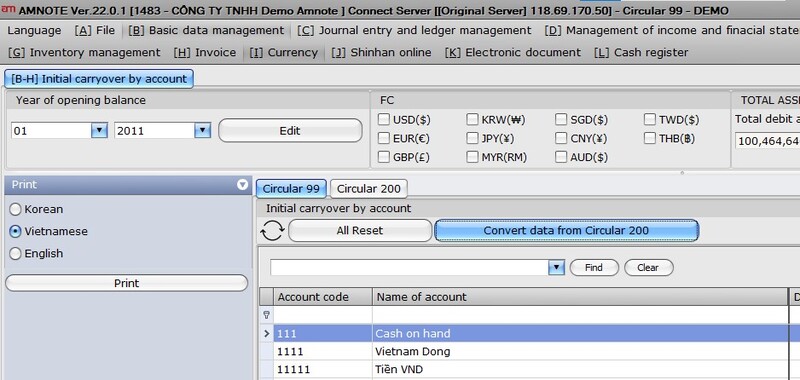
Check and select the corresponding accounts to transfer the balance.
Then click Process => Select the sections to start transferring => Apply
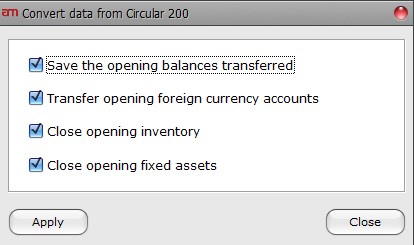
Note: The data may be carried over again if there are changes to the end-of-year 2025 data.